
Compared with a central heating boiler, a heat pump needs more time to heat the water for your heating system. It is therefore beneficial for the Pomp AO and Pomp MP to be able to run for longer periods. This is controlled by the heating demand sent by the thermostat. We therefore recommend configuring your thermostat so that it:
- Switches on and off as few times per hour as possible.
- Has the longest possible minimum on-time.
- Controls the temperature as gradually as possible.
- Uses a heat pump profile, if available.
How you configure these settings depends on your thermostat. Check the manufacturer’s manual for instructions specific to your thermostat. Below, we provide the settings for the three types of thermostats we currently install most often:
Tado X
The Tado X can be configured to optimize its control for a heat pump. To do this:
- Open the Tado app.
- Go to
Settings. - Tap
Rooms & Devices. - Tap
Select a device. - Tap
Control mode. - Select the
Heat pumpcontrol mode.
For more information, visit the Tado page: https://help.tado.com/nl/articles/13752524-wat-is-de-regelmodus
Tado V3+
Do you have a Tado V3+ thermostat? You can select the Pomp AO or Pomp MP in the Tado app. This ensures that the heat pump receives the most suitable signal from the thermostat. Follow these steps:
- Open the Tado app.
- Tap
Settingsat the bottom. - Tap
Care & Protect. - Tap
Heating boiler. - Tap
Change boiler details. - Search for
DeWarmte. - Select
Pomp AOorPomp MPand confirm the model.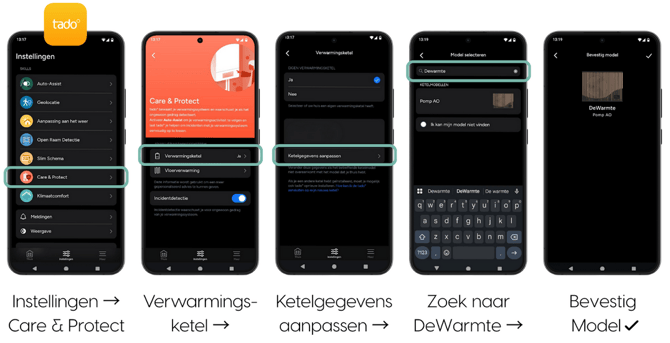
The signal from the Tado V3+ thermostat is now optimally configured!
Honeywell DT4
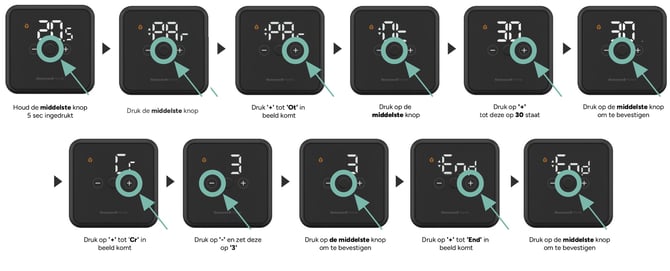
The Honeywell DT4 does not have a separate control program for heat pumps. For this thermostat, a few settings need to be adjusted. Follow these steps:
- Press and hold the middle button for 5 seconds.
Parwill appear on the display. - Press the middle button once.
- Press
+untilOtappears on the display (this is theminimum on-timesetting). - Press the middle button.
- Press
+until30appears on the display. - Press the middle button to confirm.
- Press
+untilCrappears on the display (this is thenumber of cyclessetting). - Press the middle button.
- Press
-until3appears on the display. - Press the middle button to confirm.
- Press
+untilEndappears on the display.
- Press and hold the middle button for 5 seconds.
- Press the middle button to confirm and return to normal operation.
On/Off and OpenTherm control
Some thermostats can send two different types of signals: an On/Off signal or an OpenTherm signal. The Control Unit only works properly with an On/Off signal. If it receives an OpenTherm signal, the heat pump may operate irregularly.
Do you notice irregular thermostat behavior, for example if it switches between On and Off at inconsistent intervals in our App? Check the following:
- Check the thermostat settings to see whether it is configured for OpenTherm or On/Off control. Set it to On/Off.
- Also check that the thermostat cable is correctly connected to the appropriate terminal (OpenTherm or On/Off) on the thermostat or wireless receiver.
How you configure this varies by thermostat. Check the manufacturer’s manual for the correct steps.