.png?width=100&height=74&name=Logo_Nieuw_Zwart_Transp%20(4).png)
Step 1: Check the App
Log in to your account at MyDeWarmte.
Check whether data from your heat pump is being displayed on the Insights' page.
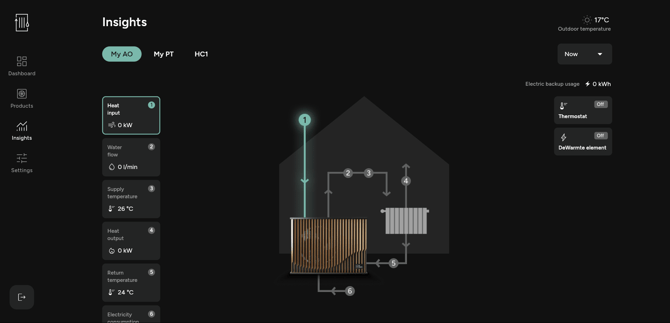
Values should be displayed in the blocks on the left-hand side of the page.
- If values are displayed, continue to step 2.
- If no values are displayed, go to this page and follow the instructions. If the instructions resolve the issue, continue to step 2.
Step 2: Thermostat
Turn up the thermostat and wait approximately 1 minute. The thermostat status, shown in the yellow box below, should change to ON. If it does not, contact Support.
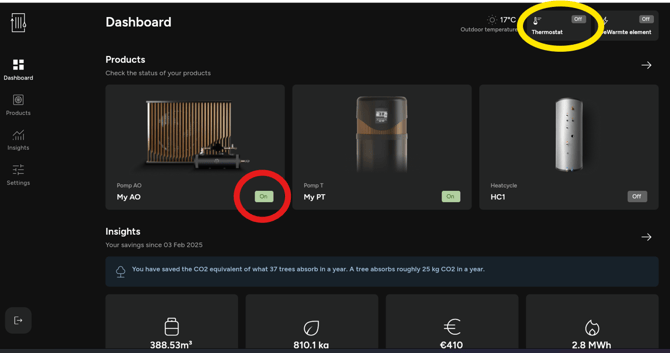
Wait another approximately 1 minute. The status box at the bottom right of the Pump AO or MP (circled in red) should also change to ON. If it does not, contact Support and describe the steps you have taken.
Step 3: Check the water pressure
If the heat pump is on, the thermostat is sending a heating demand, and the Pump AO or Pump MP switches on, but your home does not get warmer, the heat pump may not be circulating the heating water efficiently.
In this case, check whether the central heating system pressure is still between 1.5 and 2 bar and top it up if the pressure has become too low. Also see this page: How do I maintain the correct central heating system pressure?
Step 4: Optimize the heating profile
If you have successfully completed all the previous steps, your system is working properly but may not yet be configured correctly for your home and heating needs.
See this page for information on how to optimize your heating settings to make your home more comfortably warm: How do I get my home comfortably warm?
If part of your home gets warm while other areas remain cold, see this page: Part of the house is cold